

The CEO comes back from a competitor's launch and says the website looks outdated. A new one should be live by the end of the quarter. You agree the site has problems, but nobody in the room can say which ones, and a redesign is an expensive way to find out. Deciding when to redesign your website starts with a different question: what changed in the business since the site last fit it. Running that diagnosis before anyone briefs a designer is the first part of my website strategy work.
Key takeaways
- Outdated is a feeling until you trace it. Find which of five layers it points at: the story, the proof, the structure, the design or the platform.
- A rewrite and a redesign fix different layers. A rewrite changes the words and the proof on the pages you have. A redesign changes how the site is organized and how it looks, and it can move URLs.
- Run the What-Changed Test. Each change in the business points to the smallest website change that answers it. Redesign when the structure has to change, refresh when only the look or the identity does, replatform when the platform blocks the work, and rewrite everything else.
- Let evidence decide. Site behavior, search queries and what sales hears on first calls show what changed. The calendar doesn't.
An outdated website is a symptom to trace
"Outdated" describes the whole site and hides the part that's out of date. The word can point at five different things:
- The story. The headline describes the company you were two funding rounds ago, or a buyer you no longer sell to.
- The proof. The logos and case studies come from your first customers, while the pipeline now is bigger companies.
- The structure. The menu is organized around products you no longer lead with, and new buyers can't find their path.
- The design. The type, color and imagery look like the year they were chosen, and nothing else is wrong.
- The platform. Pages load slowly, or marketing can't publish one without a developer.
Each has a different fix, and only two need a designer. A checklist of signs you need a new website puts page speed next to a brand the site no longer reflects, so every item seems to argue for the same project.
A homepage hero can carry four of the five layers at once, which is why "outdated" sticks to the whole page. In the B2B hero below, captured in November 2026, the menu is the structure, the headline the story, the product visual the design and the logo wall the proof. The platform is the layer you can't see.
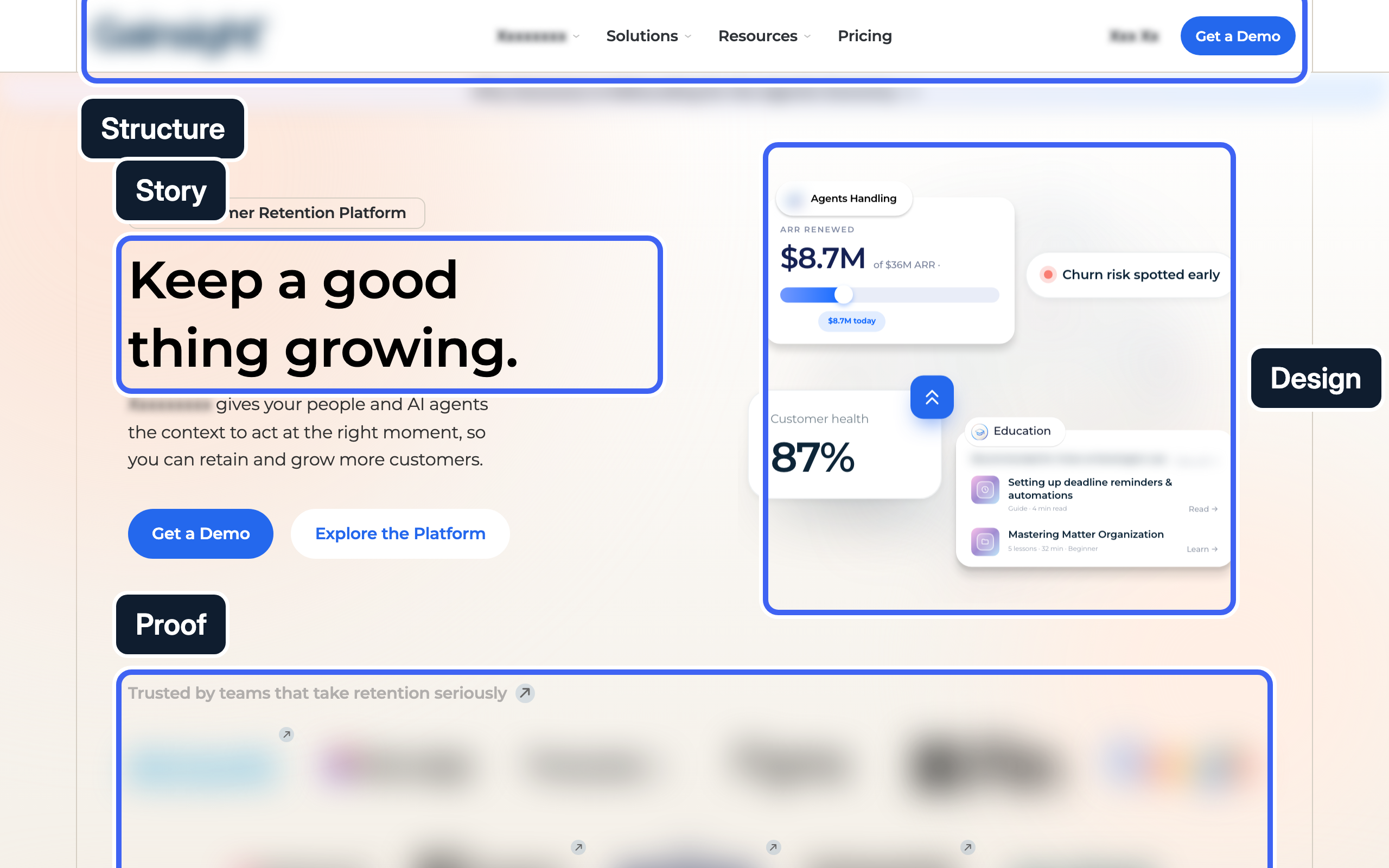
If the complaint is about the headline, everything else in a hero like this can stay as it is. The first thing my diagnosis names is the gap between the site's reputation inside the company and how visitors use it. The CEO's "outdated" is the reputation half, and the evidence is the other half.
Before anyone opens a design tool, ask the person who said "outdated" three things: compared with what, noticed by whom, and since when. "Compared with a competitor's new site" points at design. "Our reps stopped sending people to it" points at the story. "Since we started selling to enterprise" points at the audience, which lands on proof and a page or two.
Redesign and rewrite change different layers
A rewrite changes what the site says. A redesign changes how it's organized and how it looks. Four project names cover the options:
- Rewrite. New words and new proof on the pages you have, plus a page or two where a new buyer needs one: headlines, page copy, claims, case studies, logos. Templates, the menu and existing URLs stay.
- Refresh. A new visual surface on the current structure: type, color, imagery and components. Pages and URLs stay, and a new visual identity carried onto templates that still fit is a refresh too.
- Redesign. New templates and a new structure, with pages added, merged or retired and the menu rebuilt. URLs can change, and so can the words.
- Replatform. A new platform under the site: new code and a new CMS. It can keep the design and the words.
Framed as website refresh vs redesign, the choice leaves out the rewrite, the smallest of the four projects and the one that changes what buyers read first. A new coat of paint on a headline that names the wrong buyer still names the wrong buyer.
A rewrite keeps every URL, so search engines see the same pages with new words. A redesign that changes URLs is a site move, and Google's guidance on site moves says to "expect temporary fluctuation in site ranking during the move," adding that for a medium-sized site it can take a few weeks or more for Google to gradually start showing the new URLs instead of the old ones, and longer for a larger site.
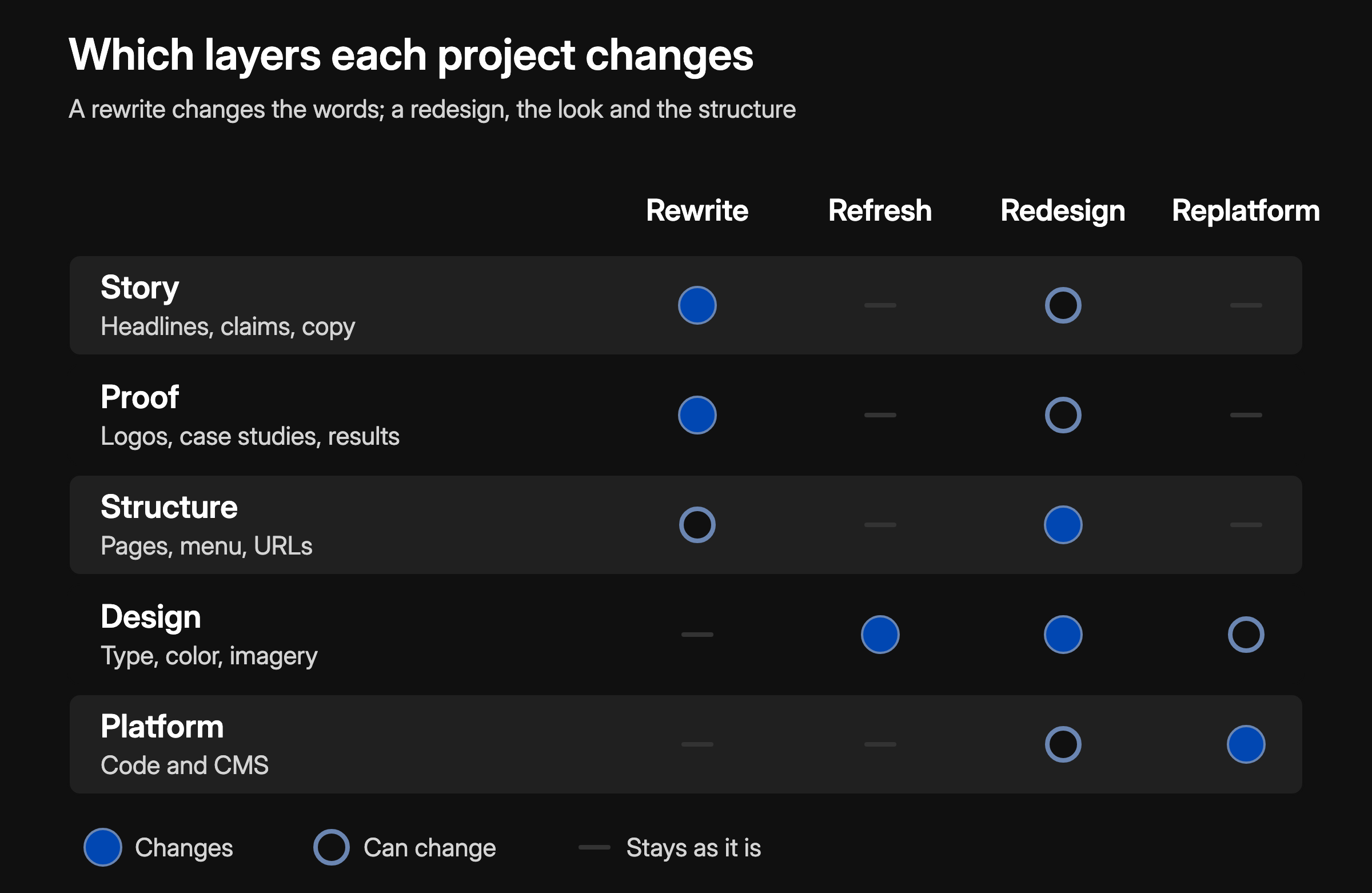
Put the project's name in the brief with its layers next to it: "Rewrite: story and proof on the homepage and three product pages; design, structure and URLs unchanged." A brief that says only "redesign" lets everyone quote a different project.
The What-Changed Test picks the smallest fix
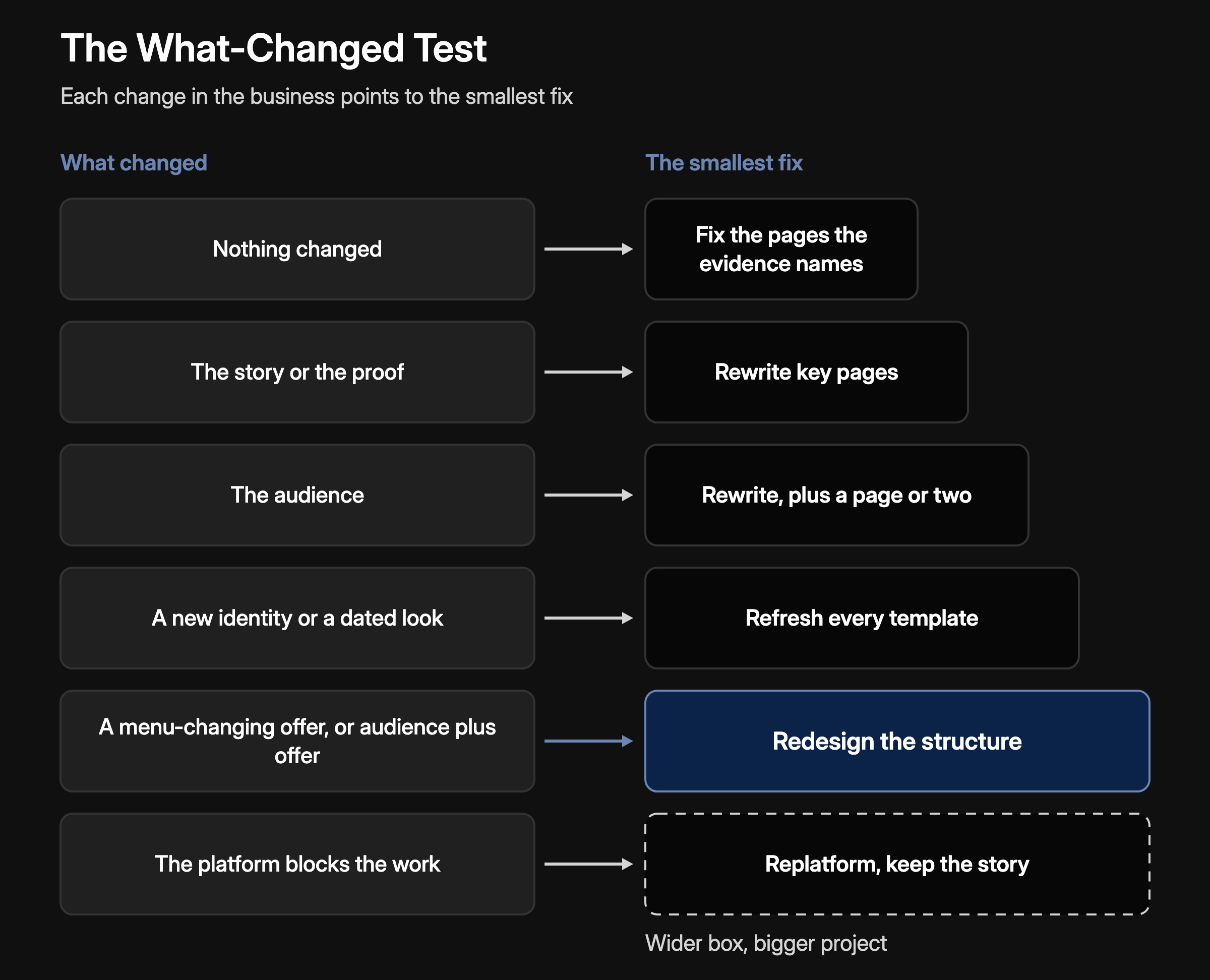
The What-Changed Test asks one question: what changed in the business since the site last fit it? Each answer points to the smallest change to the site that answers it, and to what can stay.
| What changed in the business | What changes on the site | What can stay |
|---|---|---|
| Audience: a new segment or bigger buyers, same offer | Paths for the new roles, proof from that segment, a page or two | Design, platform, the menu |
| Offer: a new product or a new way of selling | Pages for the offer and the order of the homepage; a redesign when the menu has to be reorganized around it | Platform, and the pages the offer doesn't touch |
| Story: the positioning moved | The homepage and key pages, rewritten | Design, structure, URLs |
| Proof: bigger customers, new results | Proof blocks and case pages | Everything else |
| Identity or look: a new visual identity, or a look that dates you next to the competitors buyers compare you with | Type, color, imagery and components on every template | Structure, URLs, and the words if the positioning held |
| Platform: slow templates, every edit needs a developer | A replatform on the same story | The words and the structure |
| Nothing | The specific pages the evidence names | The site |
Then apply one rule. Redesign when the structure has to change: an offer that reorganizes the menu, or a new audience arriving with a new offer that needs its own paths. Refresh when only the look has to change, a new identity or a dated look carried onto the templates you have. Replatform when the platform blocks the work. Everything else is a rewrite, which can add a page or two.
The story row needs the most care, because you can't rewrite toward a position nobody has agreed on. If the leadership team can't say what the story changed to, settle it in a positioning statement and run its Homepage Test before touching the site. For the "nothing" row, give every existing page a verdict and an owner, the way a website content strategy does, and fix the pages that fail.
Fill in the table with your leadership team before anyone mentions a vendor. If people can't agree which row changed, that disagreement is the real project, and no design brief written before it's settled will survive the first review.
Three sources show what actually changed
Three sources cover the rows, plus a check of the platform:
- How people use the site. Look at the paths into your key pages and the friction on them. Microsoft Clarity flags a rage click when a user "clicks multiple times in a clustered area in rapid succession," and a dead click when someone clicks and "gets no feedback in a reasonable amount of time." Friction gathered on the menu points at structure. Friction on every template points at design or the platform.
- What people search. The Search Console Performance report groups your data "by the search query users typed." Filter out your brand name, compare this year with last, and put the queries that bring buyers next to the words on your homepage. Words for a role you never wrote for point at the audience row, and buyers describing the problem in words your site never uses point at the story.
- What sales hears. Listen to ten first calls. If the rep spends the opening minutes correcting what the prospect read on the site, the story row changed. In a June 2025 release on Gartner's survey of 632 B2B buyers, run in August and September 2024, 69% reported "inconsistencies between information on the sales organization's website and that provided by sellers." Gartner doesn't say which side was out of date; your call notes will.
- What the platform allows. Check your templates against Google's Core Web Vitals: the main content loading within 2.5 seconds, responses to input in 200 milliseconds or less, and layout shift of 0.1 or less, measured at the 75th percentile of page loads, with mobile and desktop counted separately. The Core Web Vitals report in Search Console groups "similar web pages," the closest thing to a view by template. Then ask marketing how long a new page takes to publish.
A traffic drop deserves its own check before anyone blames the design. In Pew Research Center's March 2025 browsing data from 900 US adults who agreed to share it, visits with a Google AI summary ended in a click on a regular search result 8% of the time, against 15% for visits without one. If your top queries now show a summary, fewer clicks can be the "nothing" row.
Take what those four checks show to the meeting, and while you're in the data, record the numbers the next version should beat, starting with the meetings the site starts.
Two changes justify a full redesign
A redesign is the right project in two situations, and two others look like one without being one:
- The offer reorganized the menu. When the products you lead with changed, the structure built around the old ones has nowhere to put the new story. To check, list the sections a page for the new offer needs and compare them with the components the site already has. If most of the list is missing, the structure has to change.
- A new audience and a new offer arrived together. A new segment buying a new product needs paths the current site wasn't built for, and rewriting pages inside the old menu leaves that buyer without one.
- The brand identity changed. A new name, logo or visual system has to reach every template. If the menu and the pages still fit, that's a refresh across the site, and it becomes a redesign only when the new positioning reorganizes the structure too. Whether the brand needs a refresh or a full rebrand is a separate question, and the 20% Test answers it.
- The platform blocks the fix. If templates fail Core Web Vitals across the site and the fixes can't be made on the current platform, or marketing can't publish a page without a developer, better copy won't help. That's a replatform, and the story can come along unchanged if it still fits.
Even then, decide the story before the design. A redesign that starts with wireframes ends up choosing the message one revision round at a time, which is why the decisions phase comes first in a B2B website redesign process. If a redesign and a replatform both apply, run them one after the other: Google's site-move guide says to "change only one thing at a time."
Use the Keep List to keep the URLs that earn traffic and links and map a redirect for every page that moves. If none of these four applies, you're looking at a rewrite, whatever the request was called.
One CEO request ends as a rewrite
Take a 140-person company that sells route-planning software to regional distributors, a hypothetical built for this article. The CEO wants a new site this quarter, because the biggest competitor just relaunched. The VP of Marketing asks for two weeks and runs the test:
- Behavior: no friction gathers on the menu, and the demo page converts the visitors who reach it. Structure is fine.
- Search: new queries name fleet operations and national carriers, words the site never uses. The audience row changed.
- Sales: on first calls, reps spend the opening minutes explaining that the product is now sold on on-time delivery rather than shorter routes. The story row changed.
- Proof: the logo wall shows the first regional customers, while the last four deals were national carriers. The proof row changed.
- Look and platform: none of the call notes mentions the design, marketing publishes pages without help, and the templates pass Core Web Vitals.
Three rows changed: audience, story and proof. The offer didn't, so the menu holds, and neither did the identity or the platform. By the rule, this is a rewrite: new words on four pages, one new page and two new case studies. The VP writes it down as a one-page decision record:
- What changed: the audience (national carriers), the story (sold on on-time delivery rather than shorter routes) and the proof (four national deals).
- Evidence: the query report, the first-call notes and the deal list.
- Smallest change: rewrite the homepage, two product pages and the about page; add one page for fleet operations directors; replace the logo wall and add two case studies from national carriers.
- What stays: the design, the menu, the platform and every existing URL.
- When to revisit: after two quarters of demo data from the new pages.
The CEO gets a sharper site this quarter, and when the redesign question comes back, it comes back with data instead of a competitor's launch.
Final thoughts
This test decides the size of the website project. It doesn't decide the brand: for that, start with the 20% Test and come back. I haven't found a study that sets a redesign cycle, so treat any fixed number of years as a habit rather than a reason. When the three sources come back with more than one row changed, settle the story and the structure before anyone writes a brief. That's the work I do in a three-week website strategy engagement, and it ends with a brief the build can follow.
Frequently asked questions
When should B2B sites be redesigned?
When the structure has to change: a new offer reorganized the menu, or a new audience and a new offer arrived together. A new identity on a structure that still fits is a refresh across every template. When only the story or the proof changed, rewrite the pages you have. When the platform is the problem, replatform and keep the words.
How often should you redesign your website?
There's no fixed interval worth following. Run the What-Changed Test once a year and after any change in audience, offer or positioning, and redesign only when it points at the structure. A site whose business hasn't changed can go years on rewrites and new pages.
Should I redesign my website or just rewrite it?
Rewrite it if visitors find their way but the words or the proof no longer match the company. Redesign it if the new story needs pages and a menu the current site can't hold. A rewrite also keeps every URL, so it skips the redirects and the reindexing of a site move; rankings can still move with the new words, so watch the pages that earn traffic.
When is it time to redesign your website after a rebrand?
When the rebrand changes what the site has to hold, beyond how it looks. A new name, logo, typeface or color system has to reach every template: that's a refresh if the menu and the pages still fit, and a redesign if the new positioning reorganizes them. If the rebrand changed the positioning but kept the identity, rewrite first; the design can follow later, or not at all.
What are the goals of a website redesign?
One job and one number for the site, and a defined job for every key page. I write the first down as one primary action, one success metric, and a ranked list of what loses when goals conflict. A redesign without that list can only be judged on how it looks.