

The new site is designed, the agency has a launch date, and someone in the last planning meeting asks what happens to search. Organic traffic took years to build, and nobody on the project owns it. Website redesign SEO is that ownership: the decisions about URLs, links and content that carry what the old site earned into the new one. The ones that matter belong before design.
This is how to redesign a website without losing SEO, including the harder case where the company name and the domain change too. The rules come from Google's own documentation, linked where they're quoted, and the Keep List at the center is the part I run before any build partner is briefed.
Key takeaways
- A redesign moves rankings through four things. URLs, content, internal links and templates.
- A redirect list is only part of a migration. A rebrand with SEO also checks both domains, keeps the old one renewed and gets the best links updated.
- Every old URL gets a verdict before design. Keep, rebuild, merge or retire, with the target and the reason written down. That list is the Keep List.
- An old page goes to the page that answers the same question. The homepage takes only pages about the company as a whole, and a page that's gone for good returns a 410.
- Check the live site three times. On launch day, after a week and after a month, against the same list.
Redesigns move rankings through URLs, content and links
Website redesign and SEO meet in four places: the URL of each page, the content on it, the internal links between pages, and the templates that render them. Change the URL of a page that ranks, and Google has to find the new address, connect it to the old one and move the page's signals across.
Google's site-move guide puts a time on it: "for medium-sized websites, it can take a few weeks or more for Google to gradually start showing the new URLs instead of the old ones (and for larger sites, even longer)." The same guide says to "Expect temporary fluctuation in site ranking during the move", so the goal is a move that settles, not a flat line.
Content is the second lever, and a redesign pulls it without meaning to: a layout with shorter sections cuts the paragraphs a page ranked for. Internal links work the same way, since a new menu that drops a page leaves it with fewer links pointing in. The redesign sequence decides these things in its first phase, where they're cheap.
Before anyone quotes the project, ask four questions about the current site:
- Will any URL change?
- Will any page lose, gain or merge content?
- Will the navigation and the internal links change?
- Will the templates that render the pages change?
Every yes is a line in the SEO plan. A yes to the first question alone means you're running a migration, and it needs an owner before design starts.
Redirects are only part of migration SEO
Here's what a plan with only a redirect list covers, next to a website migration SEO plan for the same launch.
| The job | A redirect list only | A migration with SEO |
|---|---|---|
| The domain | The new name gets a new domain | Both domains' history is checked before the move is decided |
| Old URLs | Matched where a twin exists, the rest sent to the homepage or left as 404 | Every URL gets a verdict and a target page chosen by meaning |
| Links from other sites | Left to the redirects | The most valuable linking sites are asked to update |
| The old domain | Allowed to lapse after launch | Renewed, with redirects kept a year or longer |
| Structured data | The new name only | The old name in alternateName, the new domain in url |
| Page content | Rewritten for the new layout | The queries each page ranks for carried into its new version |
| Structure | Inherited from the design | URLs, categories and breadcrumbs planned with competitors in view |
| After launch | One check on launch day | Three passes against one list |
Whoever owns the right-hand column (an in-house SEO, the agency or a specialist) needs it in the plan before design, because its first four rows are settled there. Ask which column a rebrand quote covers.
Check both domains' history before the move
Domain change SEO starts with a question a rebrand plan can skip without noticing: should the domain move at all, and should it move now? The old domain carries what the company has earned in search and whatever is attached to it. The Links report lists "the root domain of sites with the most links to your site", the Performance report shows the queries each page appears for, and the Manual actions report shows penalties.
Part of that history has to move with you. If the old site has a disavow file (a list of links you've asked Google to ignore), Google's guide says to re-upload it in the new site's Search Console. A domain bought for the new name has a past as well: Google tells you to "make sure it's clean of any outstanding issues from the previous owner", namely manual actions and leftover URL removals. The Wayback Machine can show what the domain hosted before.
Then decide the order. Google's guide recommends changing one thing at a time: "move to a new domain, then change your site's layout." Its Change of Address help is blunter about doing both at once: "If you combine a site move with a redesign of the site's content and URL structure in the new location, you will probably see some traffic loss as Google might need to relearn and reassess the individual pages."
A rebrand that moves the domain and redesigns in one launch chooses the harder order, and Google's site-move clock starts the day it does. Answer three questions in writing first:
- What does the old domain earn (linking sites, ranking queries, conversions), and is there a manual action or a disavow file on it?
- What did the new domain host before, and is its Search Console clean?
- Can the domain move launch separately from the redesign, and if not, who signs off on the risk?
The Keep List gives every URL a verdict
An SEO migration is decided in a spreadsheet long before it happens on a server. I call that spreadsheet the Keep List: every URL the current site has, what each one earns, and a verdict. Google's guide says where the important URLs are: your sitemaps, the server logs or analytics "for the URLs that get the most traffic", and the Links report "for pages that have internal and external links". Add a crawl of the live site and the CMS's own list of pages.
Add the files, too. Google names "images and downloads (such as PDF documents)", because they "might already be getting traffic from Google Search or links."
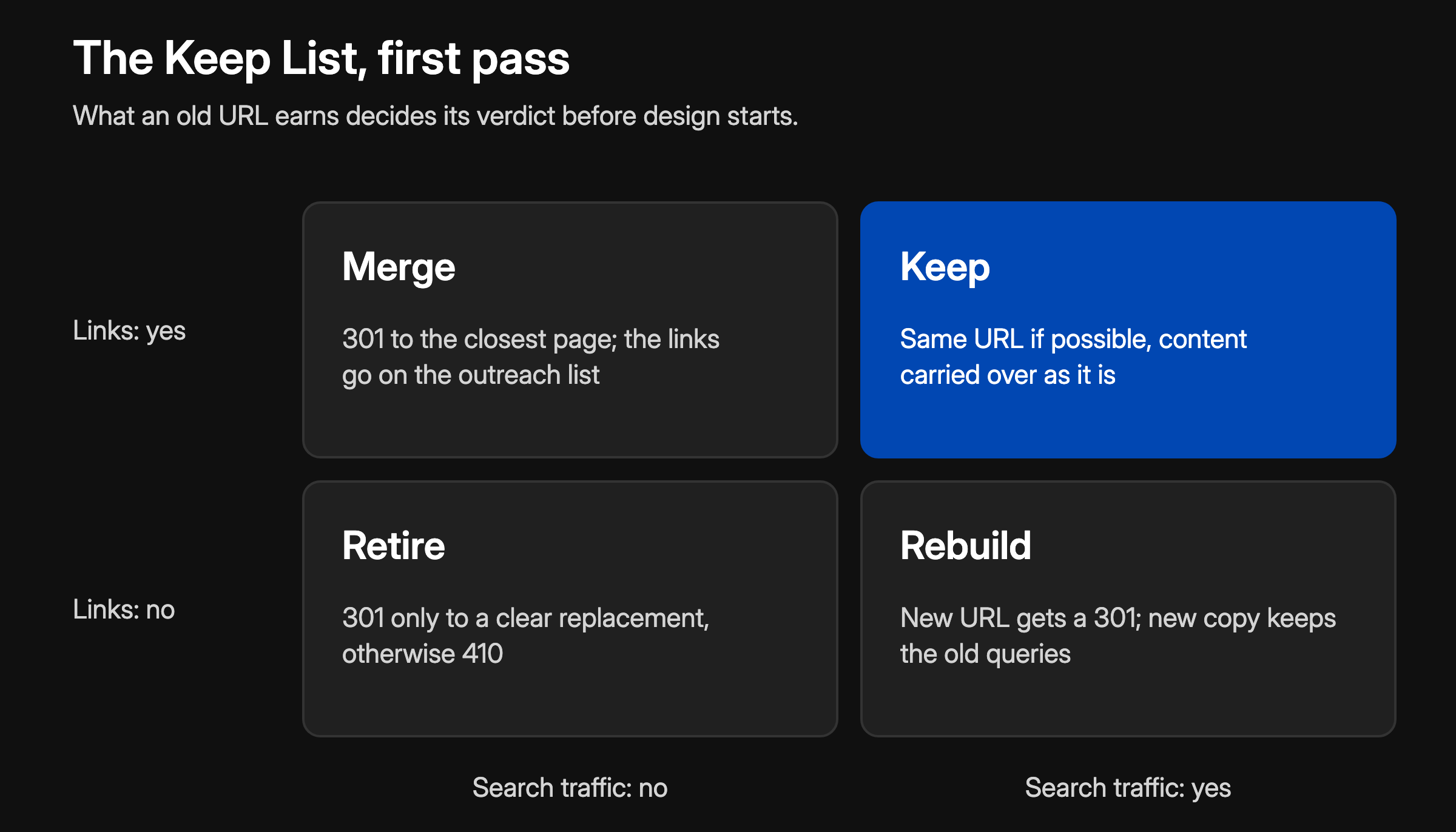
Each URL gets one of four verdicts, with the reason and the target written next to it:
- Keep. The page moves as it is, ideally on the same URL, with its content and its queries intact.
- Rebuild. The page stays, but its content or its URL changes. A new URL gets a 301, and either way the new version gets checked against the old queries.
- Merge. Several pages become one. Each old URL redirects to the merged page, which carries what every one of them ranked for.
- Retire. The page goes. It gets a 301 only to a clear replacement, otherwise a 410.
A first pass sorts by what each URL earns. Pages with traffic and links stay where they are. Pages with traffic but no links can be rebuilt, since no outside link depends on the address. Pages that only have links merge into the closest page, and pages with neither retire, unless they convert or a campaign still points at them.
The columns come from the same inventory a website content strategy starts from: old URL, clicks and impressions from Search Console, linking domains, conversions, verdict, new URL, status code and reason. A row without a reason hasn't been decided, only sorted. The verdicts and targets are settled before design; the redirects themselves get built and tested once the new URLs exist.
Map each old URL to its closest page
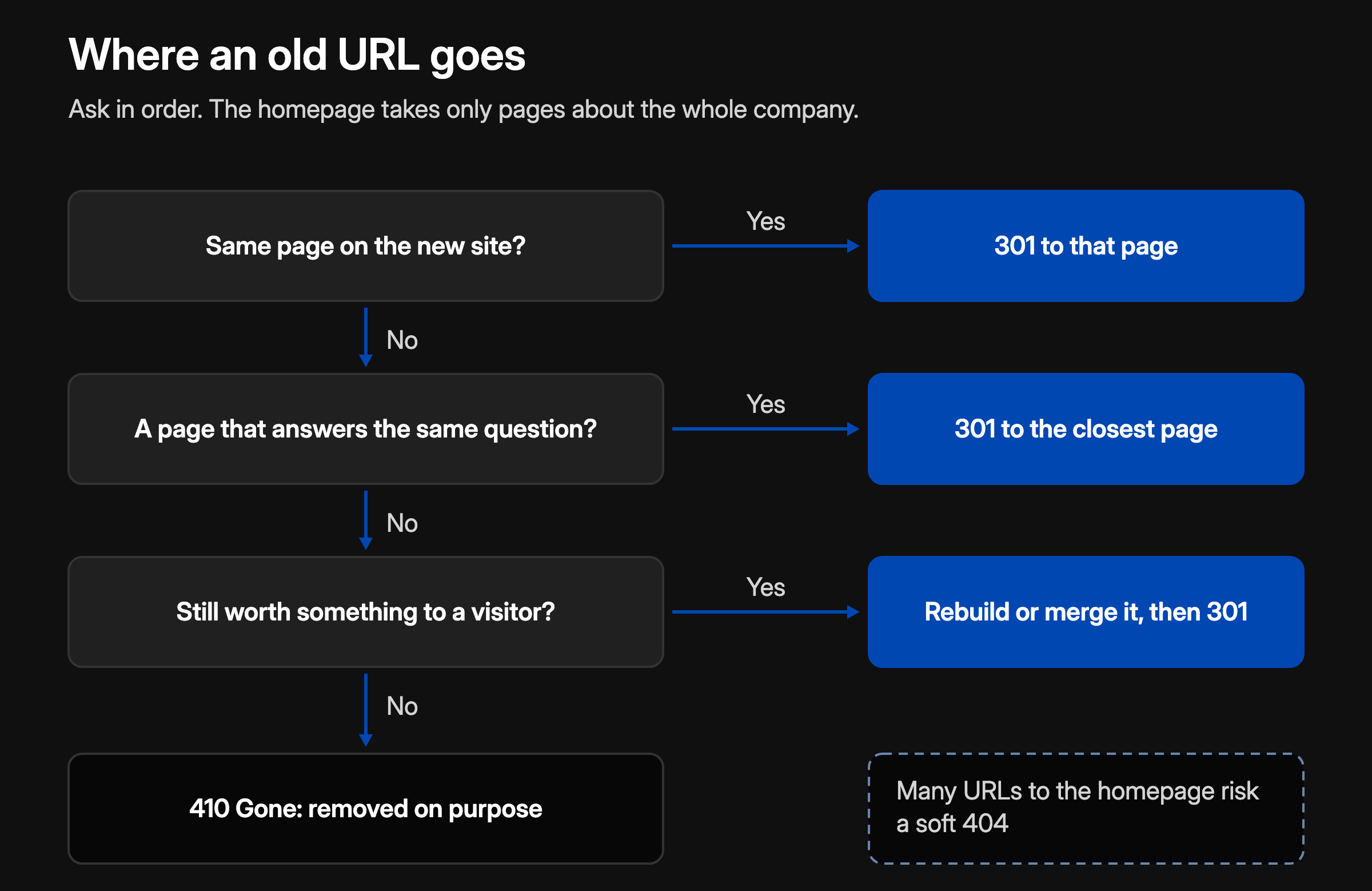
Redirect mapping is where a redirect list and a migration with SEO split hardest. The quick version sends every old URL without an obvious twin to the homepage, or lets it return a 404. Google's site-move guide rules out the first: "Don't redirect many old URLs to one irrelevant single URL destination, such as the home page of the new site. This can confuse users and might be treated as a soft 404 error."
Google's soft 404 guidance gives the two honest answers: "If your page has moved or has a clear replacement on your site, return a 301 (permanent redirect)", and "If you removed the page and there's no replacement page on your site with similar content, return a 404 (not found) or 410 (gone)." A homepage isn't a replacement for a pricing page or a guide, so it takes only pages that were about the company as a whole.
For a page with no exact twin, find the closest page by meaning: the one that answers the same question for the same buyer. An old integrations page goes to the new platform page that lists them, not to Contact. Merges are fine with Google too: "if you have consolidated content previously hosted on multiple pages to a new single page, you can redirect the older URLs to that new, consolidated page."
A 410 is for pages better forgotten: an expired offer, a past event, a product you no longer sell. Google treats it like a 404 ("All 4xx errors, except 429, are treated the same"), so what it adds is a record that the removal was deliberate.
Use server-side permanent redirects, which Google names as "301 and 308". The guide advises "redirecting to the final destination directly"; Googlebot can follow "up to 10 hops", but where a chain can't be avoided, keep it "ideally no more than 3 and fewer than 5". Name who maintains the rules after the agency hands over, because they have to run for a year or longer.
Carry the queries into the target page
A redirect moves the address. It doesn't move the reasons the page ranked. Open the Performance report grouped by page, list the queries the old URL appears for, and check the target page against them: the title, the H1 and the section that answers each one. A merged page has to answer what every donor page ranked for, or the merge drops queries without anyone noticing. Add those queries to the Keep List row.
Keep the old domain and its links working
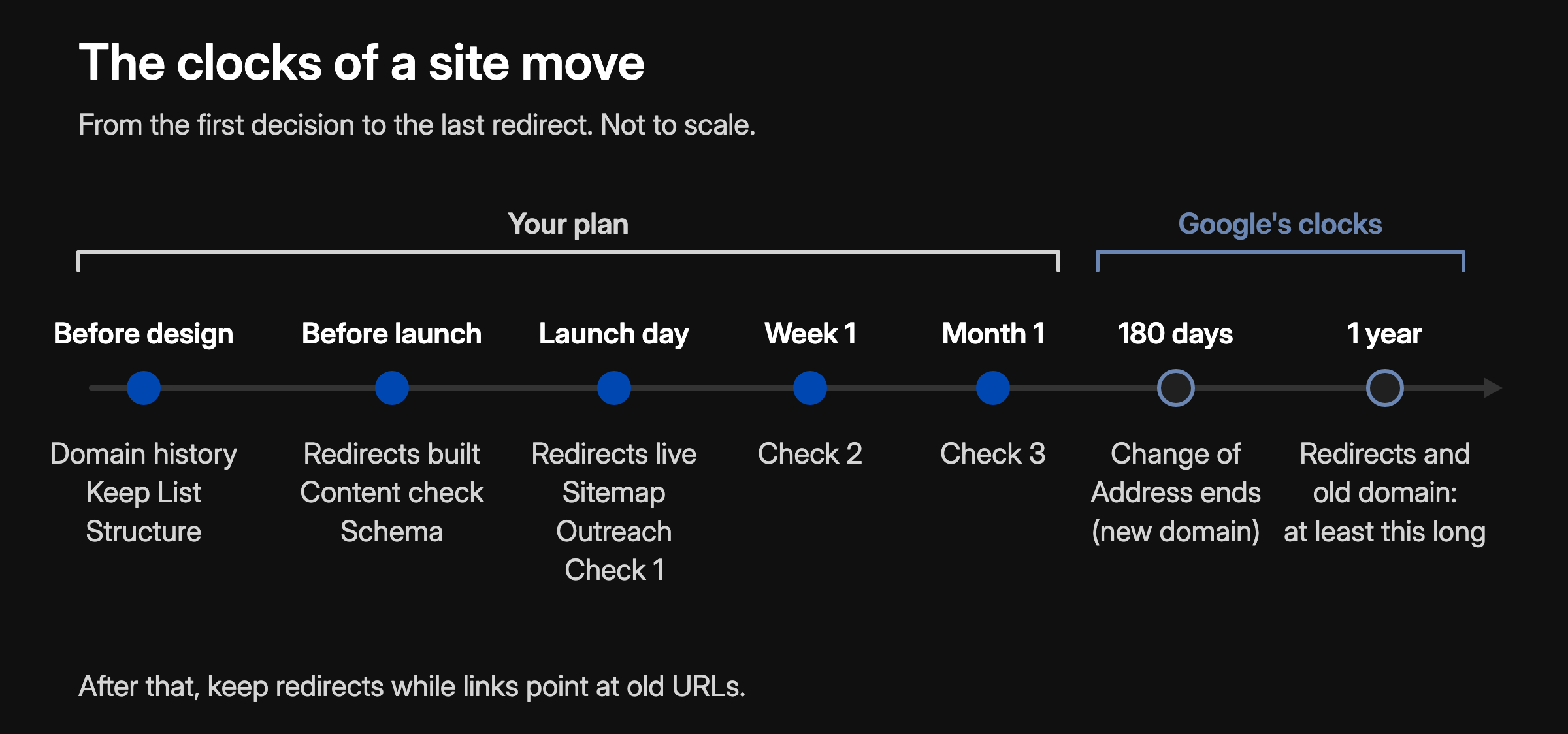
Start with the domain. Google's Change of Address help is direct: "we recommend continuing to pay for the old domain for at least a year to prevent others from buying and using your abandoned domain for malicious purposes." The redirects live on that domain, so it has to outlive them.
Google's site-move guide says to keep the redirects "as long as possible, generally at least 1 year", because that window lets Google reassign "links on other sites that point to your old URLs." For a new domain, the Change of Address request also forwards the old site's signals, and Google's Change of Address help says those actions "continue for 180 days after you start migration" in Search Console. The redirects have to outlast that window.
Then the links. SEOs call the ranking value a link passes link juice, Google calls it PageRank, and the site-move guide says a permanent redirect keeps it: "301 and other permanent redirects don't cause a loss in PageRank." The catch is that a redirected link works only while the redirect does. It depends on a domain somebody keeps renewing, and on a rule that survives every future CMS, host and agency.
Google asks for the same fix for its own reasons ("redirects are slow for users"): update "any high-volume links from other websites", and contact "the sites in the saved list of sites linking to your current content" right after the move starts. Export that list from the Links report (it's a sample, and it doesn't show which links are nofollow), rank it by the visits each link sends, and write to the people behind the best ones. Keep the note short:
Hi Sam, thanks for linking to our guide on vendor consolidation. We've renamed from Acme to Northwind, and the guide you link to now has a new address. Would you swap the link? The old one redirects, so nothing is broken; your readers just get there faster.
Some webmasters ask for a fee to change a link. Know what that is under Google's rules: its spam policies list "Exchanging money for links" as link spam, and a paid link stays within policy only when it's "qualified with a rel="nofollow" or rel="sponsored" attribute value". A qualified link brings the visitors, not the link juice, so pay only when the visitors are worth the fee.
Last, the structured data. In the Organization markup, put the old company name in alternateName, which Google defines as "Another common name that your organization goes by", and the new domain in url, which Google says "helps Google uniquely identify your organization." You can list the old domain in sameAs as well, as housekeeping rather than a signal: Google's definition, "The URL of a page on another website with additional information about your organization", doesn't cover a domain that redirects.
Plan structure, breadcrumbs and categories before design
A redesign is when the site's structure is open, so the SEO plan includes it, next to the four decisions of website strategy. Three things get decided on paper before wireframes:
- URLs that describe the page. Google notes that "Parts of the URL can be displayed in search results as breadcrumbs", so a path like /services/website-strategy tells a buyer more than /page-7.
- Categories that group what belongs together. Google ties a crawling effect to sites with "more than a few thousand URLs". On a site of a few hundred pages, categories are mainly for people, and they still fix where every page sits.
- Breadcrumbs mapped from that hierarchy. "A breadcrumb trail on a page indicates the page's position in the site hierarchy", and Google "uses breadcrumb markup in the body of a web page to categorize the information from the page in search results." Give every page one primary parent in the sitemap, so the URL, the menu and the breadcrumb tell the same story.
Then study the competitors before the architecture meeting: how their sites are built, and who ranks for the queries you want. With Fiscallion, a fractional CFO firm, the category map came first: "Before touching the sitemap I mapped how comparable fractional CFO firms build their sites." It ended as two lists, the sections every competitor runs and the combined structure worth building against. With the strategy settled before the build, the site went from 1 ranking keyword to 260 (Semrush, May 2025 against August 2026).
Bring four things to that meeting:
- the queries the site must rank for, and the page types that rank for them today;
- the sections every competitor runs, and the questions none of them answers;
- the proposed hierarchy, with a URL and a breadcrumb for each page;
- the Keep List rows that change because of it.
Check the live site three times after launch
Launch day is when the plan meets the server. Google's troubleshooting list for site moves opens with the one a staging setup leaves behind: "Don't forget to remove any noindex or robots.txt blocks that were only needed for the migration." Google also moves a site "on a per-URL basis", so problems surface over weeks. That's why the website redesign SEO checklist runs three times against the same list: on launch day, after a week and after a month.
On launch day:
- Redirects. Every row of the Keep List answers with its planned code and target, in one hop. Google suggests the URL Inspection tool for single URLs and "command line tools or scripts to test large numbers of URLs."
- Indexing rules and templates. No staging noindex or robots.txt block is left, each new URL carries a self-referencing canonical tag, as Google's guide asks, and every page type renders its title, H1 and structured data.
- Internal links. The menu and the body links point at the new URLs, not at redirects.
- Search Console. The new sitemap is submitted. For a new domain, the Change of Address request goes out from the old property, for every variant of it, www and non-www included.
- Structured data. The Organization markup carries the new name and URL, with the old name in alternateName.
After a week, read the Page indexing and Sitemaps reports for 404s the map missed and for redirect errors. Google suggests you "Submit the two sitemaps you saved earlier from the mapping", old and new, and watch the indexed counts cross over. After a month, compare clicks and impressions page by page against the old site, list the queries that dropped, and check how far the outreach list has got.
Expect the move to look unfinished for a while. When this site relaunched on 13 October 2026, the check six days later caught it halfway. Google had crawled 6 of the 30 URLs in the new sitemap since launch day. Five old URLs that now redirect, four posts and the old booking page, were still listed as indexed, none of them recrawled since the redirects went live, and /contact, the page the booking URL now points to, was crawled but not yet indexed.
Final thoughts
Everything in this article is cheaper the earlier it's decided. A redirect map written during strategy costs spreadsheet time; written after launch, it costs whatever ranked in between. The method holds for a B2B site of a few hundred pages on one domain and in one language. Thousands of URLs, several languages or a JavaScript-heavy build add work that belongs to an SEO specialist, and the order of the decisions stays the same.
In my strategy work, the Keep List is part of the sitemap: every page that exists today gets its verdict, with the reason and the redirect specified, before anyone designs the new site. If your rebrand is about to brief a build partner, that's the work I do as a B2B website strategy consultant.
Frequently asked questions
Does a website redesign affect SEO?
It does when something underneath the design changes: the URLs, the content, the internal links or the templates. A new look on the same URLs and the same copy carries little risk. New URLs make it a migration, which needs a redirect map; rewritten pages need a content check either way.
How long until rankings settle after a migration?
Google doesn't give a date. Its site-move guide says that for medium-sized sites "it can take a few weeks or more for Google to gradually start showing the new URLs instead of the old ones (and for larger sites, even longer)", and that "a site's rankings will settle down over time." Judge the move page by page, not on the site total.
Do 301 redirects pass link juice?
Yes. Google says "301 and other permanent redirects don't cause a loss in PageRank." The risk is the redirect's lifespan, not its strength: keep the old domain and the rules alive, and get the most valuable links pointed at the new URLs.
How long should we keep the old domain?
Keep the redirects "as long as possible, generally at least 1 year", as Google's site-move guide puts it, and from users' perspective it says to "consider keeping redirects indefinitely." Change of Address help recommends paying for the old domain for at least a year so nobody else can buy it. If valuable links still point at it after that, keep it as long as they do.
Should we change the domain during a rebrand?
Only after checking what the old domain earns and what the new one carries from its past. If you can, move the domain first and redesign later, since Google recommends changing one thing at a time. A rebranding strategy settles whether the name changes at all, and whether the domain follows it.
What is an SEO migration?
Any change that moves pages to new addresses: a new domain, a new URL structure, or a new CMS that changes the URLs. The redirects carry the addresses; the Keep List and the checks make sure each page's search value arrives too.